User Creation | 75Health EHR
Creating a User
This guide explains how to create a new user in your 75Health account.
Prerequisites
- You must have a registered 75Health account.
- You must be logged in.
Who Can Use This Feature
Only the Account Owner has permission to create new users.
Steps to Create a User
- Log in to your 75Health account.
- Go to the Manage.
- Select Users.
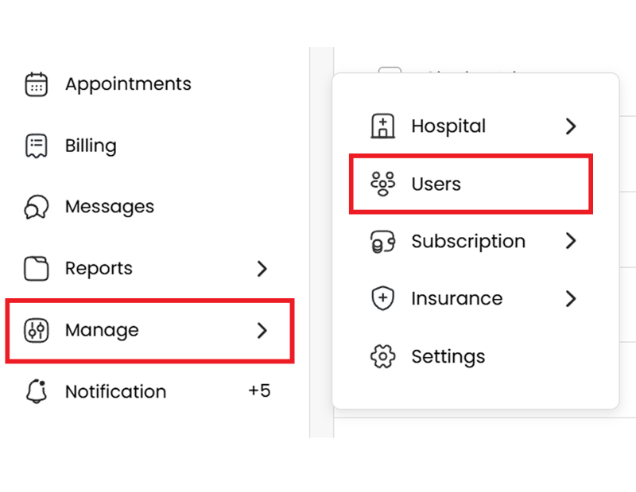
4. Click Add New User in the top-right corner.

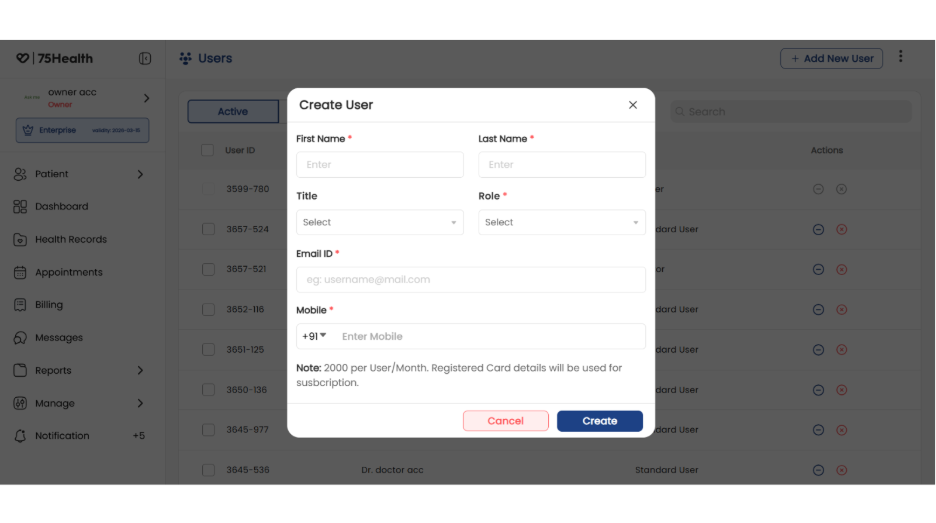
5. Enter the required details:
- First Name
- Last Name
- Title
- Role
- Email ID
- Phone Number
6. Click Create.
Important Note:
The following roles are charged based on the subscription plan:
- Admin
- Doctor
- Standard User
The following roles are free of cost:
- Front-Desk User
- Pharmacist
- Lab Technician
Activate the Created User
- Once the user is created, an activation email will be sent to the registered email address.
- The user must set their password using the link in the email.
- Until the password is set, the account will appear in the Not Activated list.
- After the password is set, the account will automatically move to the Activated list.
Result
The user is successfully created and activated.